It Just Works

Marco Arment wrote about Apple losing the ‘functional high ground’ earlier this year, and it was met with tons of discussion – blog posts, podcasts, twitter battles and more. The part that hit me was the final paragraph:

I fear that Apple’s leadership doesn’t realize quite how badly and deeply their software flaws have damaged their reputation, because if they realized it, they’d make serious changes that don’t appear to be happening. Instead, the opposite appears to be happening: the pace of rapid updates on multiple product lines seems to be expanding and accelerating.

Like every tech company nowadays, Apple wants to do it all. They can’t simply sell great phones (their hardware design and quality is still best-in-class by a longshot if you ask me) – they have to sell the best phones, build operating systems for them, and build an entire application, service and peripheral ecosystem around their hardware business. This is not an easy task, and the absolutely insane growth of Apple over the past 10–15 years has made it tough for their culture and hiring practices to keep up. Just look at this graph of their stock’s growth:

apple-stocks

The easy thing to jab Apple about is their cloud services but I feel their system software and bundled apps are also beginning to lose its luster. The “it just works” pitch that sold me 15 or so years ago no longer is as open and shut as it once was, as even stock systems tend to be fairly unreliable at times with basic things like home networking, AirPlay, Spotlight indexing, Finder performance and Bluetooth connectivity. Most of these are OS X gripes and I’m hopeful that El Capitan turns things around here, but a purely anecdotal recap of my Mac use over the past few years leads me to believe there’s been a decline in quality. I bought a 2010 iMac that I sold recently to replace with a 2015 13″ MacBook Pro and its had a lot of reliability issues since I purchased it. Further, I’ve been through 3 laptops at work since starting there about 2 years ago now. Usually this was due to hardware issues, but the final ‘fix’ for a lot of my problems at work was to revert to a machine with Mavericks on it.

In my opinion, Yosemite is the worst non-beta Mac OS release I’ve ever used – and I’ve used everything other than the public betas of 10.0. While I didn’t run into any data loss issues or anything particularly catastrophic, the issues I see are more a simple erosion of the attention to detail and quality I’ve come to expect from Apple. That’s the tradeoff, right? You pay a little more for their fantastic hardware and in return you get a integrated, easy-to-use system that is light years ahead of the competition.

Anything that touches the internet generally is a weak spot for Apple, and while I do feel they are getting better (see the Photos app and it’s mostly solid CloudKit integration as an example), there are just as many examples of things like iWork, Apple Music/iTunes, iTunes connect, iCloud Mail and others being extremely unreliable and buggy. While I trust Apple in the sense that I know they are not looking to sell/profit from/give away my data, I do not trust them to actually have that data available or always correct. This is not good.

The Desktop

I can’t tell you the last time I really trusted software that Apple builds on the desktop. Instead of being excited about what they’re putting out, I instead turn my thoughts to “I wonder what will go wrong with this?”, which is hard to undo once you start thinking that way. Whether it’s the newest iOS, Mac OS, Photos app, iTunes or Apple Music, I’m always noticing how flimsy the entire product tends to be or feel. The most recent fiasco is the discoveryd mess, which caused most Mac users to have horrible wifi connection issues for months before Apple rolled back their previous daemon for networking with the 10.10.4 release. Kudos for them for falling on the sword and going back to it, but it’s baffling how it made it into the final release to begin with. My Apple TVs still have (2) after their names.

I still have laggy bluetooth on Yosemite nearly a year after it was released and at this point I have no idea if it’s ever going to get better. I simply started using a wired keyboard and mouse at work and when at home I just use my laptop’s built in keyboard/trackpad when I have to do any serious writing. Heck, I’ve even used my iPad with a bluetooth keyboard at times because it’s more responsive than my brand new, maxed out 13″ Macbook Pro. This was never an issue on Mavericks or before – even on a 2010 iMac with a spinning HDD.

I’m hopeful that this year’s El Capitan release will bring the focus on reliability and stability they have promised – early indications is that it is much faster and more stable even in beta releases.

iOS

Fortunately, one place Apple is still pushing forward and focusing on quality seems to be on iOS. Switching to Android would bring its own set of problems while solving others, so I’m not thinking about doing that just yet. Overall, I’m quite happy with the direction of iOS – especially with the upcoming features for the iPad and iPhone in iOS 9. However, my ‘junk drawer’ has continued to grow on Apple’s mobile platform, with me slowly using fewer and fewer default apps on iOS. In addition, while the design language around the iOS 7 ‘flat’ design is getting tweaks over time, I still prefer the Material Design used by Google at this time. A few years ago, I never would have thought I’d ever say Google is doing a better job at creating an attractive, consistent and usable interface, but they really are putting some distance between themselves and Cupertino right now.

While iOS devices are well built and the OS is generally very good, I still see more issues today than I did in years past. Some of that makes sense – platforms are much more complex than they were even 5 years ago, but the point remains. I’m seeing more and more Bluetooth issues as of late, although I also use more Bluetooth devices these days so it’s hard to pinpoint the culprit there.

Non-OS software

Here is where I feel like Apple is falling in their face these days. Generally, the core OS works well enough for me if I’m on mobile or desktop, but applications like iTunes, iWork, Mail, Finder, Remote and others seem to be constantly rough around the edges. iTunes is the easy target here – instead of doing what is difficult but right with their flagship media product, Apple crams additional features yet removes none with every major release. Consider the list of default Apple apps and the replacement that I currently use:

  • Apple Maps → Google maps
  • Safari → Chrome
  • Notes → Evernote
  • Podcasts → Pocket Casts
  • Calendar → Fantastical
  • Weather → Check the Weather
  • Reminders → OmniFocus

The only Apple apps on my home screen are Mail, Messages, Camera, Photos and Passbook. Not a great ratio. I mention this because it makes it easier for myself and anyone else to decide to try another platform if they like if their vendor lock-in is so low. Further, if users get in the habit of looking at default Apple apps on iOS and thinking “oh, I don’t need this” it actually creates a negative perception in their mind. Apple isn’t in the “surprise and delight” business as much as they used to be – instead, they’re focused on locking their users into their ecosystem, and honestly the apps they’re using to do that are not very good.

Cloud services

Here’s where things get really ugly. If you’ve been following Apple news lately, you probably have heard your share of horror stories about Apple Music amongst other things. While I personally have not had any data-related issues with Apple Music (but god knows I’ve got multiple backups of my music both on and off-site), the reliability of the service has been a real disappointment. Network connection issues, slow sync of things like play counts and ratings as well as serious downtime (Beats 1 was down for hours on their launch day and have had numerous other smaller outages in the past month) all have contributed to a rocky start for Apple Music, and I’m not even talking about the UX issues right now.

Other iCloud-based services are more hit and miss. Photos has been mostly solid for me, although I did have some issues with photos being duplicated on my initial migration to the new system. While not as fast as Dropbox, iCloud Drive seems to work fine, as does Reminders and other things that are based on CloudKit – which is a huge improvement over the previous iCloud sync functionality offered by Apple. However, not everything is based on this infrastructure and probably never will be. The entire iTunes/App Store ecosystem is based on WebObjects, which is a relic of the 90s. It’s surely been modernized and updated since then, but it’s very difficult to imagine the whole iTunes/App store back end being rewritten any time soon to handle something more modern. In addition, iTunes Connect is universally panned by developers as a pretty horrible place, while Google’s Developer Console is pretty well received as a modern, easy to use system for Devs to get their apps published and averrable to users for purchase. In short, a huge blind spot for Apple is their publishing platform for a massive part of their business and I’m curious to see if they have the will and ability to actually attack this huge blind spot head on.

The solution

My personal mindset is pretty simple these days – I feel like the more I trust Apple with a service that requires an application they built, the more let down I am. This is not a good trend, and it’s hard to undo this sort of thing with anything other than shipping great software and services, and doing it all of the time. People lose their minds when Google services go down because it happens once a year. When Apple services go down, people just shrug or write a blog post like this.

Additionally, I’ve begun to hedge my bets and avoid buying into Apple’s ecosystem too much when I can avoid it. This means that instead of buying lots of Airplay-compatible speakers, I’ll be buying a Sonos system instead. Rather than looking at something that is HomeKit based, I might invest in a Nest instead. And obviously, I trust Apple with their cloud services as little as possible – instead, I use Google’s cloud, Dropbox and others with my data these days. Instead of doubling down on Apple’s streaming solutions in the household, I’m buying a NAS that can work with any HTPC or video streaming solution. I’m not looking to get out of the Apple ecosystem per se, but I am making sure that if things continue to trend in a downward fashion I have a fairly easy exodus ahead of me.

That’s fine for Daniel, but how does Apple deliver the high-quality products we expect?

Apple has to find a way to keep up with the competition on the desktop and the mobile space while still delivering software that is as high-quality as their hardware is. In a lot of ways, the annual schedule puts their teams in a situation where they either ship their software in the fall with iOS/OS X (and now watchOS) releases, or they miss an entire year. I think Apple needs to reprioritize the marketing aspect of WWDC a bit and focus more on actually talking to developers about what is new in the keynote, and ship incremental updates as part of point releases when possible. Music for iOS, Photos for Mac, emoji updates and a few others come to mind as examples of when Apple has opted to push out new features/applications off-cycle, and this sort of thinking will help engineering teams ship things when they’re ready. Apple Music isn’t a perfect example because a lot of people have had horrible experiences with the cloud portion of the service as well, but the off-cycle release part is what I’m pointing to. Make WWDC about the system, the APIs and possibly look to emulate the ‘tick-tock’ model used by Intel as well as Apple’s iPhones. One year you can add a few large features and the next year can be a “stop, consolidate and listen” moment where performance, stability and API cleanup are the focus. By releasing other core apps on a point release schedule they’re less beholden to the major release events to push updates when they’re ready.

Another approach, and I know this goes against a lot of what Apple currently does, would be to think of their company in terms of divisions a bit more. That would help things ship when they’re done, instead of based on one monolithic schedule. It also would at least help the company from stealing resources from one group to get another project done on time. Apple famously announced Leopard delays years ago because they wanted to focus on getting iOS out the door, which speaks to their culture of using resources as a shared pool that can be interchanged and assigned to projects instead of being focused on making one specific project the best it can be.

That said, I’m just lowly end user that understands how difficult this stuff is, but that it has to get better. Apple is great at taking something complicated and making it simple, but they’re not great at taking something that’s complicated and making it both powerful and slightly less complicated these days. If that means new rollouts like Apple Music need to follow the Apple Photos/iWork/iMovie route of blowing things up and releasing a bare-bones replacement that slowly gets new features added over time, go for it. That approach makes people angry as well but I think that you get better software for it in the long run. The way things currently are trending, my patience with their products is slowly eroding to a place where I’d be considering making different purchasing decisions the next time I’m in the market for a phone/tablet/computer. Those are bold words if you know me at all, but it’s becoming more and more of a consideration these days.

Initial Apple Music Impressions

apple-music-logo

On June 30th at around 10am, the switch was flipped on the iOS 8.4 upgrade that contained the new Apple Music app and about an hour later, Beats 1 went live on the new streaming service. Overall, it’s been a fairly smooth launch from what I gather, and I’ve had a chance to kick the tires on most of the service to report my initial findings. This is by no means a full review, but I thought it might be helpful for people a bit less obsessed than I am with music and especially streaming music services.

What is Apple Music?

Like Rdio, Spotify, Google Music and others, Apple Music is a streaming music service that allows users to pay $9.99 a month for the ability to stream any song, on demand, from the nearly 30 million songs in their catalog. In short, you’re renting the ability to play any song or album, when you want it. On mobile devices, users can download and ‘save’ songs, albums or playlists so that they don’t use up their mobile bandwidth. While Apple Music is pretty run of the mill when it comes to this part of their service, they offer a few components that aren’t Earth shattering on their own, but the little differences add up to make something pretty compelling.

iTunes Match is dead, long live iCloud Music Library

Apple has had this kinda-sorta cloud music solution called iTunes Match for a while now. Basically, you pay $25/year and iTunes will scan your library, matching the tracks that you own with those in the cloud, and will upload tracks you own that may not be in the iTunes Store catalog. Conceptually, it is pretty solid and I’ve used it on and off over the past few years. You can sync playlists between devices and access all your music on any Apple device you own. However, sync wasn’t always reliable or fast. But for the price it was a pretty good value all things considered.

With Apple Music, we now have the iCloud Music Library, which is pretty much the same thing as Match.

Curation & For You

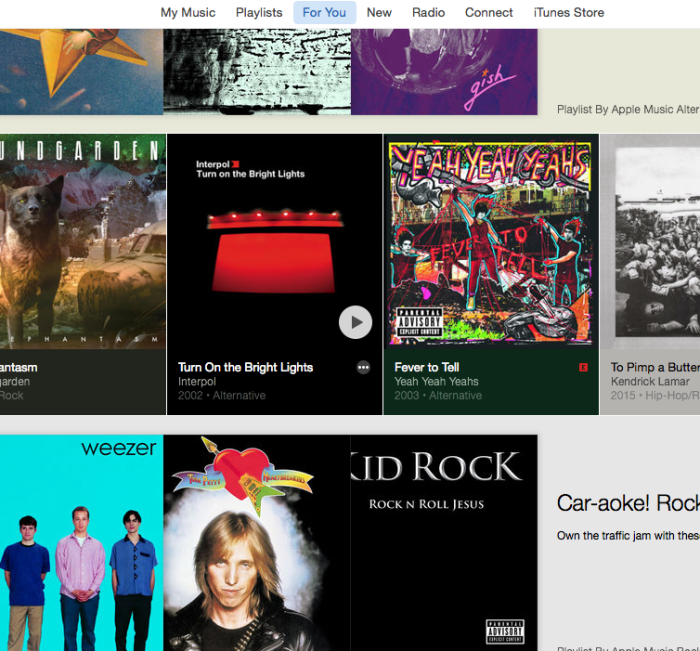
for-you

The thing I loved about Beats Music when I gave it a shot last year was the way they curated playlists based on moods, history or influences and recommended them to you based on what you listened to.

And they were really, really good.

I was amazed by how spot on the albums and playlists were, and it was the one service I used that solved the ‘what should I listen to right now?’ problem. Well, the same feature is in Apple Music – the more music you add to your library or love, the better the suggestions will get over time. This is presented in the ‘For You’ section of Apple Music as a series of cards that let you choose from playlists or albums that they think you might like. Over time, these recommendations get really accurate, and I’m always finding something new to listen to (or rediscovering old albums I haven’t heard in a while).

Beats 1

Apple-Beats-1-logo

You could argue Apple helped kill the radio with iTunes and the iPod but they’re now trying to bring the patient back to life with Beats 1.  Basically, it’s an always-on internet streaming station featuring a few prominent tastemakers / DJs as well as shows featuring popular artists that rotate out every few months.  Folks like Elton John, Q-Tip, Drake, and Josh Homme all have shows once a week amongst others.  It goes along with the other ‘curation’ attempts Apple is making to differentiate itself, and after giving it a go for a few days, I’m way more impressed with it than I thought I’d be.

Connect

This is kind of like a Twitter/Instagram style service that artists can use to connect with fans. You can allow Apple Music to auto-follow artists in your collection so I’ve already seen a few dozen posts from artists and they range from useless to actually really interesting. Trent Reznor posted some old NIN instrumental tracks that were really awesome to hear and I also saw some cool concert photos.

Screenshot 2015-07-02 10.37.50

You can imagine this part of the service will either die on the vine or become something much, much bigger over time. I could see this becoming a way to learn about upcoming shows, selling merchandise and promoting other things artists are doing. Further, I could see Apple getting into the ticketing game if Connect takes off. It’s not too far fetched to imagine a scenario in which an artist you follow due to saving one of their albums alerts you to a concert in your area via Connect, and you then use Apple Pay to purchase tickets. The pass is automatically added to passbook, a calendar entry is made on your phone for the event with directions, and you can share you’re going with one tap on Facebook or Twitter, with a link to the same post you saw embedded. Pretty slick if you’re the concert going type, and most of the ingredients are already in place.

The Good

I had high hopes that Apple would keep smart playlists around and they actually outdid what I was hoping for.

Not only are smart playlists still retained in the form they were prior to Apple Music’s launch, they actually give you the ability to integrate anything that is added to your library from the streaming tracks you are ‘renting’ as well. There is a new value for the iCloud Status meta property – Apple Music. This means songs you own and songs you’re renting can co-mingle in playlists and even smart playlists. Once they’re part of your iCloud Music Library, you are able to work with them just like any other track. This also makes it fairly easy to manage which tracks you have added from Apple Music, and which ones you own:

Screenshot 2015-07-02 10.38.10

For someone like me, this is huge. I like to make playlists based on how often I listen to music or sort by songs I’ve rated highly, etc. Being able to have the music I own and the music from a streaming service comingle like this is perfect.

I wasn’t expecting to say this, but Beats 1 is way better than I thought it would be. I figured it’d be a total gimmick – and it still may fall flat as the novelty wears off – but there’s something about that communal experience of listening to music you know thousands of others are also enjoying at the same time. It wouldn’t be worth a damn if the music wasn’t good, though, and the segments I have listened to so far have been really, really good. Not always the exact type of music I’d dig up myself but I’m enjoying it a lot so far, especially while at work.

I’ll be curious to see how things mature long term with Beats 1 – do they fill out the roster with more and more shows or do they splinter into a few different stations. Either way, consider me very pleasantly surprised that Radio On The Internet is actually kinda compelling.

The Bad

One thing I’ve seen some people talk about is issues with tracks having DRM on them if you are using the Match portion of the service. Definitely worth backing up your library if you’re going to make the jump. Another stupid thing I blame the music industry for is the fact that you can’t stream Beats 1 to multiple speakers from iTunes.

I feel like those issues are, on some level, out of Apple’s hands and I only hold them responsible for poor communication. However, there are some serious UX issues that hopefully can be resolved in time for iTunes 13 and iOS 9, but I’m not holding my breath. The on-boarding process is especially cumbersome, and while I was already used to the way the Beats ‘blob’ thing worked, I kind of hated it already. The software on both platforms is fairly confusing at first to even myself, who I’d consider a veteran of iTunes and Music on the Mac.

A lot of folks are talking about how this is Apple’s chance to rethink things now that the dust of the launch is settling, and I agree 110%. Conceptually, they nailed it, but the user experience can be cumbersome.

For example, did you know you can ‘love’ anything, regardless of it you have it in your library or not? But, once it’s in your library you can both love/not love a track and also rate it 1–5 stars?  I think Apple needs to pick a path and go with it.

It’s also not possible at this time to add songs that aren’t in your library to a playlist.  Let’s say I’m trying to make a playlist of songs for the beach or for the holidays and I want to add some songs I don’t really want cluttering up my Library.  For now, tough luck.  This is a two-step process of adding songs to the library and then adding those songs to a playlist I create.

When I am listening to a radio station, it’s unclear if pressing the ‘love’ button loves the station or the song. It sometimes persists through the entire radio session.

It can be difficult on the desktop to find an artist’s page and just queue up an album of theirs. If I find an album I want to preview before adding to my library, I’m out of luck. I can either press the play button and immediately hear it, or I have to click on the little ‘…’ icon, add the music to my library, go back to ‘My Music’ and then add the album to ‘up next’. Spotify’s UX on this sort of quick discovery is way better, as I’m able to simply right click on anything and ‘add to queue’.

Apple seems to be struggling to make iTunes work for people who want to buy their music and those who just want a pure streaming experience. When I’m looking at an artist in my collection and I click on ‘view more from this artist’, I’m taken to the store. As a streaming customer, I’d expect to be taken to a list of all of the tracks in Apple Music, and maybe a link or section at the bottom of tracks or albums I can purchase. Definitely a difficult problem to solve, but this is a UX challenge I hope Apple sits back and addresses for iTunes 13 and Music for iOS 9.

In short, I think that Apple’s concept of ‘My Music’ is both very powerful and very confusing. The fact that once a track is in your library it’s just like any other song is pretty awesome. It means you could in theory add more info for a track, rate them, add them to smart playlists and more. However, the downside is that it limits adding songs that you don’t have in your library to a playlist, like in most other streaming services (even Beats Music). Most of these issues don’t apply to the iOS versions of the app, but it’s a bummer that iTunes is such a mess (still).

There are also a number of nitpicky bugs that are to be expected from what is essentially a massive scale launch of a 1.0 product. I don’t expect perfection at launch but I do expect they’ll get cleaned up soon.

  • Some of the albums that I have in my collection do not show up as such when I look at a song from a playlist or other medium.
  • On the desktop, that damn ‘disconnected cloud’ icon is the bane of my existence. I usually just have to restart iTunes from time to time to get it to connect reliably. This has been a problem for me sporadically since the Match days, so who knows if it’ll clear up.
  • The Beats 1 station always has the ‘loved’ state. I mean, I do like Beats 1 but not every song…
  • Adding songs to my library from radio stations has been spotty for me. I was out for a walk tonight and heard a few songs I really liked on Beats 1. I pulled out my phone, clicked the ‘add to library’ button, verified that it was added via the checkbox dialog, and put the phone back up. The next day, the tracks weren’t in my library. Bummer.

‘Easy’ fixes

Some of the fixes I really hope that make their way into a future product are as follows:

  • Swiping left and right on a playlist or while listening to an album should skip to the next/previous track
  • Double tapping on the icons at the bottom of the iOS app should jump you to the top of the list that you’re viewing.
  • When you click the ‘back’ button on the Mac, I wish it would take you to the exact spot you were viewing instead of back to the top. Persistent state is way easier to nail nowadays, I know this.
  • When you’re listening to a song on Beats 1, a Radio station or a playlist, I wish you could directly add the song to your playlist & that would also add the song to your library in one action.
  • Make it easier to correct issues with ‘Matched’ music. Google Music nails this, as you can upload your own track to replace one that is incorrect, add your own artwork or edit metadata and it actually makes its way through the system.
  • Make it easier to mass clear downloaded tracks/albums/playlists and make it clearer what’s happening.
  • I should be able to right click on anything and add it to ‘up next’ in a consistent, reliable manner.  Whether it’s an album, a song or a playlist the behavior should always be there an always work.

Overall Impression

Apple could have done a better job explaining the service to users as well as taking this moment to simplify much like they did with Photos and iWork previously. I understand it’s a very fine line to walk but this was their 1.0 moment to really streamline what the service does as well as better explain/articulate things. There has been a lot of confusion about how the Match service works, as well as Home Sharing changes that have surprised people.

I guess I don’t get why they had to launch this summer – they could have taken their time and announced this when they were really ready. I suppose iOS 9 was the marker they wanted to be live by, but they must have decided to deal with whatever growing pains there were going to be.

Most of my complaints are with the fairly poor job that was done thinking about user experience on the Mac and communicating a lot of the differences between Match, Apple Music and Beats Music. From a software perspective, the iPad and iPhone versions are outstanding in most every way.

That said, Apple Music is conceptually the service I’ve been waiting for since I started using Rdio back in 2009. Apple really nailed almost everything I asked for in this blog post, and I anticipate things to get ironed out over the next year. Apple has the best curation/discovery tools, Beats 1 is way more compelling than I thought, they kept their Match service and integrated it, and even allowed Smart Playlists to work with their streaming music. It’s not perfect, but so far I think this is the service I’ve been waiting for.  I’ve already cancelled my Spotify subscription and I can’t really envision a scenario that has me going back.

Once I’ve had a month or two with the service I’ll dig deeper and report back.

The Apple Watch

About 2 weeks ago, my wife handed me a box that contained a 42mm stainless steel Apple Watch w/ a black Sport Band. It was an early Father’s Day / 5 year Anniversary combo gift, but it had showed up about 2 weeks early and she knew there was no way my impulsive self would have been able to function knowing that box was somewhere in our house. So, thanks to her generosity I’ve had a few weeks now to put things through their paces and report my initial impressions.

But first, I wanted to back up to what my expectations of the Apple Watch are to provide some context to my thoughts. After the keynote in September of 2014, I was excited about the future of wearable tech and definitely thought that the actual hardware looked fantastic. However, I wanted to see it in person before making any decision.

What I was looking for in the Apple Watch

The things I’m looking for in a device like the Apple Watch, roughly in the following order:

  1. Fitness
  2. Use my phone at home less
  3. ‘Fashion’
  4. Apps

In the past 6 months, I have started running 5 days a week, and combined with watching what I eat I’ve lost over 25lbs. I want to keep that going – 15 more pounds to go!, and I’m the sort of guy that needs data to keep me motivated. I was previously using a combination of my iPhone and a FitBit, but I wanted something a bit nicer to track distance run, heart rate, steps walked during the day, etc. I’ve been relying on Apple’s HealthKit to be the glue that holds together apps like MyFitnessPal, Runkeeper and Pedometer++ to give me an overall picture of how much I’m active, how much I eat, and how my runs are going. Finding something more portable than an iPhone and more powerful than a FitBit sounded like a good reason to try the Apple Watch on its own. Add to that the motivational features like reminders to get up and move, goals that change over time and ‘badges’ for sticking to a workout regimen and I was sold.

Additionally, I’m a bit addicted to having my phone on me when at home or at work. I wanted to find a way to break that tether a bit and thought a device like the Apple Watch would allow me to leave my phone behind while I’m not out and about. Being able to see and respond to simple texts and see/dismiss notifications from my wrist seemed very appealing to me, and I was hopeful this would reduce my dependency on an iPhone while at home.

I’ve also just wanted a new watch. My wife bought me a watch as a wedding gift but it’s a bit too dressy for daily wear. I wanted something that could counter that for daily use and also add some of the above benefits.

Finally, I was at least somewhat interested to see what the first generation apps on the Watch looked like. I had pretty low expectations given the early reviews and the architecture behind the WatchKit apps (essentially, the ‘apps’ are nothing more than projections of UI from your phone to your watch via bluetooth. Any data, computations or new views would have to make a round trip from your phone to your watch. I expected this to be slow and generally useless for most tasks). I think that the future of apps on the Watch is exciting but didn’t expect a lot for 1.0.

My first two weeks

The first few days I found myself tinkering with everything – watch faces, apps, notifications and settings – for the better part of the day. I nearly killed the battery every day because of this, but I never got to 0%. That definitely impressed me, as most folks were fearful of what would happen in real-life use. Once I started to ‘forget’ about the watch on my wrist a bit more, average battery life was at about 40–50% at the end of the day (a day for me starts around 7am and ends around 11pm, with a 30 minute run 5 days a week).

I’ve had to re-train myself to use Siri more often, but now that I’m getting into that habit, dictation is fantastic. I was mowing the lawn recently and was able to respond to a few messages from my mom while the mower was going. I just had to turn away and speak very close to the watch, and my messages were transcribed perfectly. Totally dorky, but I felt like I was living in the future. I’m responding to texts, setting calendar alerts, asking for directions and issuing lots of other commands very frequently with the watch and it works very well.

A few odds and ends:

  • It took me a few weeks to get used to the UI – it’s so easy to think of the Watch as a tiny iPhone but it really is a whole different paradigm.
  • The Apple Watch app on the iPhone is (other than the icon) pretty well done and makes managing the device a breeze.
  • My kingdom for a systemwide concept of VIPs. I would love to only show notifications via text or email from folks I really care about.
  • The watch face brightness level can be turned down to the lowest setting and is still great even in direct light. I’d imagine it helps with battery life but I haven’t really seen a difference yet.
  • I used my Watch to buy from a vending machine, as a boarding pass at the airport and to make a few purchases at stores. Compared to the reaction I get with my phone, people think I’m a spy from the future (and probably kind of a dork too)

Fitness

The fitness tracking is great – subtle reminders to get up to move around and the visible ‘fitness circles’ on the watch face keep your activity front of mind.  I love how easy it is to start and stop a workout from your wrist, as well as control your music.  Right now, I still run with my phone in my pocket for podcasts but I’ve also taken the watch for a spin on its own to see how things work when it is unpaired.

I’ve been very happy with the workout app on the watch as it gives you glance able info about your run/walk/bike ride but also tracks heart rate very accurately as well as calories burned.  I do wish it handled intervals like runkeeper, but for now I’m just glancing to check my pace from time to time. I’ve also done a few runs using the runkeeper app on the watch and it works quite well if you’re doing interval training.  The downside is that it’s reliant on the phone so if you want to be as minimal as possible while running that’s a problem.

Overall I am very happy with the workout features and it feels like Apple is walking the walk on making this a great device for people looking to take more control of their personal fitness. The workout app on the iPhone gives a great overview of how you are doing and tracks the ‘awards’ you unlock as well.  Very polished app, and another one in that new ‘dark’ theme. Hmm…

Putting my phone down

I look at my phone way less often than I did pre-Watch. When I’m at home now, I tend to leave my phone on the table on whichever floor I’m on instead of keeping it in my pocket most of the time. When I get things like texts, notifications or emails I can now quickly look down and see if it is important and either respond or get back to playing with my son. The same applies for when I’m at work and want to quickly see when/where my next meeting is or what the weather is going to be like if I’m about to step out of the office. The reason that this sort of thing is important to me is that I have the awful habit of getting ‘sucked in’ when I pull out my phone to do something fairly innocent like checking the weather and end up screwing around on Twitter for 20 minutes. Removing these huge distractions gives you tons of time back to focus on things like doing puzzles with your 2 year old, paying attention in a meeting, having a conversation with your wife, or simply improving your phone’s battery life.

To the last point, my iPhone’s battery life is much better since I’ve settled into a rhythm. I look at my phone way less now. By setting important notifications to come to my wrist, the two OCD things I’ve done in the past (checking the time and seeing if I have any new notifications) don’t require taking the phone out of my pocket. By not picking up my device and turning the screen on so often, I’m noticing I end the day with about 45–55% left, where previously I was in the 30% range. There was one glitch on the 3rd day that I owned the Watch, however – I had to unpair/repair when I noticed an issue with the iPhone’s battery life. In short, something was causing the phone to never go into ‘idle’ mode and was trying to keep a constant connection with the watch, causing the battery on both devices to drop pretty significantly. After a fresh re-pairing, I’m noticing great battery life on both the phone and the watch.

It does seem like driving with my watch wrist (left) is causing some battery drain. I guess it’s turning the screen on more than I notice, which is dropping the juice considerably.

Fashion

I tried on a handful of models in the store before deciding this was something I wanted, but that’s only a few minutes in a store. After wearing the 42mm stainless model for a few weeks, I do like the way it looks on my wrist. It’s a great size, it’s not too heavy and the Sport Band is super comfortable. I plan on getting a leather or nylon strap pretty soon to replace the Sport Band as my ‘daily’ band and using the Sport for working out, but even the default looks pretty good (at a distance it looks like leather, honestly). I’m very happy with the way this looks and since I plan on owning this model for the next few years (my goal is to own it until it’s obsoleted by a software update or when proper GPS is added, whichever is later) I’m hoping the stainless will age well.

The Apps

As stated above, I wasn’t super optimistic about the 1.0 Apple Watch landscape going in for a few reasons. I was fearful that a lot of the developers were rushing to have their apps available on day 1 at the expense of using the device and then designing/building an app. Further, the technical limits of WatchKit 1.0 had me pretty lukewarm on the whole idea. If the whole point of a smartwatch is quick, 3–5 second interactions, I’m not sure super laggy interfaces and latent data transmission via bluetooth is really going to lend itself to a great experience.

Unfortunately, my fears were mostly spot on. A huge chunk of watch Apps are mostly useless. It should be noted that ‘glances’ are a bit better – these are the data sources you get from swiping up from the bottom of the screen. I use the following glances: Settings, Battery, Power (for iPhone), Now Playing, Heartbeat, Activity, OmniFocus, Pennies, Calendar, Weather, NYTimes, Maps. All of these provide quick bits of data or singular actionable buttons that are mostly a pleasure to use. I barely touch the actual apps at this point, though.

Great Apps:

  • Overcast
  • Fantastical
  • Twitterrific
  • Pennies
  • Most stock apple ones.

Not So Great Apps

Most of them. Almost any app that needs data from my phone struggles to deliver it in a timely fashion unless the phone is very close by. I’m hoping watchOS 2 addresses this with native apps and better wifi networking.

The future with watchOS 2.0

A lot of the issues I have right now are performance based and I’m really hopeful that watchOS 2.0 squashes a lot of those. Custom complications, time travel and native apps alone are huge updates and I can’t wait to try them out. It’ll be interesting to see how long each generation is supported – are they going to try to position Watches as longer term investments or just another consumer device you should upgrade every few years? I’m not hopeful it’ll be sold/marketed any differently but it’ll be interesting to see how the next few rounds of software and hardware releases unfold.

So, is it worth it?

To me, the biggest selling points when folks ask me “do you like it?” is that I genuinely feel more motivated to be active because of the Apple Watch, and I have noticed a significant drop in the amount of time I’m just staring at my phone. As the watch starts to ‘disappear’ and become less of a novelty in your life, the more value it actually brings to your day to day life. That’s a huge value proposition, and one that Apple has struggled to make in my opinion. I get it – selling a thing that makes one of their other things used less seems like a bad pitch, not to mention admitting how addictive smartphones can be. I can’t stress how much I value not having to worry about missing a notification but still being able to set my phone aside.

In short, the apps kind of suck and probably will continue to do so until watchOS 2 is released. Data transfer of info to glances and apps can be glacially slow at times. Sometimes the watch won’t wake up unless you master a fairly demonstrative wrist flick gesture. The UI can be confusing at first. The lack of custom complications make some of the watch faces kind of useless.

And yet I love this thing. It’s totally a 1.0 product but I am very happy that I got one, and can’t wait to see where things go from here.

I think that anyone who is fairly invested in the Apple ecosystem and wants something akin to a FitBit but is willing to pay a bit more should look at the Apple Watch very seriously. For $350/$400 you can get something that is extremely well built – without hesitation, I think this is the nicest Apple device I’ve ever owned – and gives you tons of fitness possibilities. You can mostly ignore the apps for now and still have something worth owning for the price, and I think the usefulness of these types of devices is going to skyrocket over the next 6–12 months. Investing in the stainless or gold versions are a bit riskier given how quickly this sort of tech turns over, but I think that anyone who is somewhat tech savvy and physically active would benefit greatly from owning an Apple Watch.

Bulletin Shutting Down

Sad but it had to happen. We were too late to the RSS ‘gold rush’ after the Google Reader announcement. I’m still proud of what Michael and I were able to build but there are so many great alternatives that are backed by an infinitely larger userbase than Bulletin’s.

I have some ideas rattling around for a possible re-launch of the service one day, but nothing is planned at this time.

getbulletin:

Bulletin.io will be shutting down in early 2016. New registrations have been closed, and existing accounts have been put into complimentary mode. No additional subscriptions will be collected.

Thanks to all of our customers for your support these few years.
– Michael & Daniel

A shorter version ‘A month with the Nexus 5’

I realize how long that previous post was.  If you want the short version, here are my reasons to stick with Android and the Nexus 5 vs the reasons to switch back to an iPhone when the iPhone 6 comes out.

Reasons to stick with Android

  1. Keyboards are much better – more accurate, offer predictions.  There’s nothing like it on iOS.
  2. The larger screen is a joy to use.
  3. Intents are better than the half-baked url schemes in iOS.
  4. Notifications are better on Android – actionable, you can clear them singularly, and the LED notifications are a nice touch.
  5. Locale and apps like it are game-changers in how they allow you to let the phone manage itself.

Reasons to jump back to iOS

  1. Android is missing key apps (OmniFocus, Tweetbot, etc) that make using the OS always feel a bit hollow.
  2. The hardware isn’t as good as Apple’s. Camera quality, overall build quality and screen quality are unmatched.
  3. Apple ecosystem is more integrated, especially given my ownership of mostly Apple products.
  4. iMessages, warts and all, is a fantasatic way to keep in touch with my world, who almost exclusively use iOS.
  5. Android is too ‘fiddly’. I’m always searching forums for bugs and how to address them, dealing with janky software, and searching for good replacements for apps I loved on iOS.

Google’s Nexus 7

Every year or so, usually around Google I/O, I like to see what’s new in the Android world. As a big fan of Apple stuff, sometimes it’s easy to get the blinders on and not see what the competition is doing well or differently. With that said, I think that iOS is losing ground as an OS in some ways to Android, and it might actually be a result of focusing too much on Google. Little geeky things like UI customization and control over notifications and intents make the experience in Android land better than that of an iDevice when you pick one up for the first time. The app war still skews heavily towards Apple and will for some time, so it’s not like I’m looking to switch teams or anything, but I am always intrigued by advances in the mobile space. Obviously, there’s a downside to ‘fiddly’, over-customizable systems as well, but I really like what Google is doing with their ‘Google Now’ product, newfound focus on consistent UI, and bringing the Android Market under the ‘Play’ umbrella.

If you’re a tech nerd you’ve no doubt heard about the new Google tablet, the Nexus 7. It’s the same form factor as the Kindle Fire and other 7″ tablets, but this model is straight from Google. Most notable about that is that the latest and greatest software version (‘Jelly Bean’, v4.1) is loaded up and it’s a pretty impressive compared to older versions of the Android software (even 4.0). The other item that is making waves is the price point, a relatively affordable $199 with a $25 Google Play store credit for the 8gb version. Nobody in their right mind is comparing this against an iPad straight up, but this is obviously intended to kneecap the Kindle Fire momentum and get folks thinking about buying a cheaper iPad 2 to take pause. This is a good thing. Competition will force Google, Apple, and anyone else trying to make inroads in the phone/tablet market to push harder to bring consumers what they want.

So, being the gadget geek that I am, I got my hands on a Nexus 7.

I’ve had a little bit of time to mess around with the Nexus and I left intrigued. It’s a fairly well known fact that I’m a bit of an Apple enthusiast – owning an iPad, iPhone, Apple TV, iMac and a few iPods amongst other things will do that – but I’m also not going to blindly bash another product based on that. Admittedly, the pre-4.0 Android phones have, for the most part, been inferior to iPhones for my needs. The OS was slow and jittery, battery life was generally sub par, and build quality was (depending on vendor) cheap. There were exceptions to be sure, but most of the Android-based phones and tablets I used were comically bad. Things have changed a bit since then, however. Google partnered with ASUS to build this tablet and I’ve been pretty impressed with the speed, build quality, and overall look and feel of the device. I really dig the way it feels in your hand – it’s perfect for reading, browsing the web, or checking up on a calendar. There is a rubber backing that is grippy but doesn’t feel cheap.

After a weekend of use, here’s what I can report about not only the Nexus, but also Android 4.1 from the perspective of an iOS user:

Pro

First, the pros. There are a lot of things I really like about the Nexus 7 – it’s fast, the OS is a bit of a change from what I’m used to but overall I like it a lot.

  • The system wide sharing. Any app can opt into this, and it’s really awesome.
  • Background updates for apps like Evernote, Instapaper, etc. Less time manually updating, more time just using.
  • Widgets are kind of gimmicky but a nice option.
  • Obviously the system wide google integration is fantastic.
  • If you are a tinkerer and enjoy tweaking settings, this is the device for you.
  • Google Now seems like a neat idea but I’m yet to see it show up much.
  • $25 Google Play gift cert!
  • Auto updating apps. You don’t need to wait to be told updates are available, the updates just work.
  • I absolutely love the form factor of the device. It’s a fantastic weight and fits in your hand perfectly.
  • In a lot of ways you feel very ‘in control’ of an Android device in ways you don’t an iOS device. This isn’t completely a pro, but it does help with things like downloads, seeing what is killing your battery, etc.
  • Side loading of apps is a really neat feature. I’m still waiting and hoping that Apple implements a feature similar to what we see in Mountain Lion (but I’m not counting on it)

Con

However, it’s not all fun and games. There are a lot of little quality issues and they add up to make a great experience just ‘good’.

  • Keyboard auto complete not as good. The suggestions above the keyboard are nice, however.
  • Text selection in general is fussy and slow. Copying and pasting is a chore.
  • The entire OS isn’t as smooth as iOS is (even with generally beefy specs) and generally feels “cheaper” than an iOS device. ‘Project Butter’ was a big step forward for Android, it scrolling is still not quite there.
  • The lack of good system fonts really shows through. In general, the user is dealing with either serif or sans serif fonts, and that’s all.
  • Back button. I never quite understand where I am going to go when I press the system-wide back button. Maybe this gets easier to understand over time.
  • Speakers are average at best on the device.
  • While Google Music has a web based interface, which I do like, it forces the user to upload ALL of their music to the cloud – there is no “matching” like iTunes Match can do. Took 4 days.
  • This will be addressed soon I’m sure, but most Nexus apps are scaled up versions of phone apps.
  • This is a generalization, but the attention to detail in most Android apps just isn’t the same as you’ll see in iOS.  When you’re dealing with a glass rectangle, software generally trumps hardware.  I feel like iOS software currently trumps it’s Android counterpart.
  • It’s nearly impossible to type in in landscape. This is a portrait device.
  • Holy cow, the iPad seems huge now.
  • In the same vein about being ‘in control’, in other ways you quickly get overwhelmed with preferences, auto-updating settings and other issues that end up killing your battery.
  • Apple got it right with push notifications. Setting each app to auto-update on it’s own schedule is tedious and can slowly kill your battery before you know what happened.
  • Build quality of the Nexus just isn’t up to par of the iPad but considering it’s more than half the cost, this shouldn’t’ be a surprise.  I actually had to return mine due to some ‘ghosting’ issues on the screen.
  • Overall, I admire the open source nature of Android but the bottom line is most of the services that make Android great are not open at all, and could be taken away at any moment (google music, gmail, google calendar, etc). I’m always dealing with a tiny bit of anxiety when working with Google products for this reason. The best apps for Android appear to be the ones bundled with the OS, and for iOS it’s quite the contrary.

Conclusion

It’s going to be hard for anyone to beat what Google has put together at this price point. The device is high quality, fast, and is a fantastic form factor. Using it for a week or so has been a very nice experience, but ultimately one that makes me appreciate iOS even more. There are definitely features and paradigms in the Android world i would love to see in iOS but ultimately things still just feel a little ‘cheap’. I will say this, however: with Android 4.1, it’s the first time I’d be ok with using an android phone if need be. That alone is a huge endorsement of a product that felt like a really, really bad copy of iOS as recently as a year ago.

Things are generally fast and beginning to show a level of polish you’d expect the giant that is Google could produce. I would definitely recommend this device to anyone looking for a nice, affordable tablet.

Sublime Text 2

I’ve come to realize that I’m no longer a tinkerer. As I said in a recent post, I’m done fiddling with software and hardware. What I didn’t mention was that there was one exception – text editors. Being in the industry that I’m in, I spend a ton of my time writing and formatting text. In the search for the perfect environment to perform these tasks, I’ve spend a considerable amount of money trying to track down the perfect piece of software to help me quickly and easily move through my day. A great text editor helps you do so many little things that, on their surface, don’t really seem like much. But all of those little automated tasks and nifty shortcuts add up real fast.

This actually started out as a review of Coda 2. However, somewhere between the time where I got excited about the upcoming editor from Panic (announced last fall) and today, I started trying out a little editor called Sublime Text 2. While I purchased and really do think that Coda 2 is a fine editor, it’s going to be difficult to pull me away from all of the little things that make Sublime Text such an amazing editor.

Coda 2.0 is, in nearly every measurable way, a huge upgrade over Coda 1.x. However, I can’t shake the feeling that it’s a text editor designed for people who currently use Dreamweaver and are looking for something better. There’s no way else to say it without sounding like ‘that guy’, but it feels like a text editor with training wheels. Advanced web developers need more customizability, more keyboard shortcuts, more speed, and better syntax highlighting/checking/coloring for the $99 price tag that Coda retails for.  Further, the app’s major feature is an inline preview feature that sounds great but is fiddly due to the fact that most developers are working in enviornments that  aren’t really suited to one static file that you can just tab over to and preview.  I know you can tweak the Coda preferences to allow for this to work a bit better, but it’s not quite as elegant once you get into even slightly advanced workflows.

So then, what makes Sublime Text 2 so great? In a lot of ways, ST2 is a spiritual successor to TextMate – it’s a lightweight, extensible, fast text editor with an amazing community.  Nearly the entire UI can be customized, from the ‘chrome’ colors (you can make the UI light or dark or nearly anything in between), to the tab behavior, to the editor colors, error alert delays, etc.  It’s really as simple or as powerful as you’d like it to be.  Of course, it’s a fantastic text editor too.  The document overview feature allows you to quickly scroll and find that one function or bit of code you’re looking for.  Code completion, hinting and formatting work very similarly to how TextMate operates, and is highly customizable.

Being the dork that I am, the great text editor features only scratch the surface. Not only does it work the way I expect it to in nearly every way, it also has all of the little automatic features that I absolutely love. For example, you can drag your support folder to Dropbox and have a synced environment, preferences and all, between multiple machines. ST2 also has a package manager that is github-powered, keyboard activated, and has auto-updating technology so you’re always up to date.

Everything is powered by a command pallette that allows you to issue commands like svn updates, search for file names to open/preview, search css selectors or function names, and so much more. Not having to take your hands off of the keyboard is a huge productivity gain, and makes the interface very extensible. For example, I have added a handful of great extensions to the editor that do inline syntax checking/coloring, bracket highlighting, svn status updates, allow for sftp support, automatically add all vendor prefixes to css3 properties, and much more. Editors like Coda allow for plugins but it’s a process that never sees updates and generally doesn’t feel integrated into the editor.

Initially, I hated one feature of Sublime Text but have grown to love it. Instead of a standard preferences dialog with checkboxes, ST2 keeps all of its preferences in JSON arrays that are specific to each plugin, theme, or for the general app. While it does take a bit to get used to it, it makes it really easy to back up prefs or tweak things exactly the way you want to. The only things I can really say against ST2 is that a lot of preference changes require a restart, which can be disruptive to your workflow. Otherwise, any missing feature from Coda, BBEdit or TextMate is generally a quick search away.

There’s not a ton of great documentation from the developer (yet?) but there are some great blog posts with more info if Sublime Text is your sort of thing. The app costs $59 but has an ‘unlimited’ trial while you’re evaluating. It’s a per-user license so you can use it on Windows, Mac or PC.  I’ve used a ton of editors over the years and this is the first one that doesn’t have a glaring weakness in my mind.  As I mentioned above, this started out as me listing the pros and cons of Coda 2, but I quickly realized that in this increasingly complicated web development world, we don’t often have a single static page open that allows us to take advantage of most of the features that the Panic guys have included in their flagship editor.  If you spend your days in a text editor on the PC, Mac or Linux, I highly recommend checking this little beauty out.